by Daisy Dao
More than 40 million people log into Roblox every single day, and the vast majority of them are children under 13. Is roblox safe for kids is one of the most common questions parents ask right now — and it's a smart one to ask. Just like you'd research before buying the right products for your family, such as finding the best freezable lunch bag for school days, it pays to understand exactly what your child is playing online before they spend hours in it.

Roblox isn't a single game. It's a massive online platform where players — most of them kids — build and share their own games with the community. The platform hosts millions of user-made experiences, from simple obstacle courses to elaborate role-playing worlds. That creative freedom is what makes it exciting. It's also what raises legitimate safety questions for parents.
This guide walks you through everything you need to know. We'll cover how the platform works, what the real risks are, and what you can do to make Roblox safer for your child starting today. For more family-focused guidance, explore our parenting tips and resources.
Contents
Roblox launched in 2006 and has grown steadily ever since. According to Wikipedia's overview of Roblox, it has become one of the most widely used online gaming platforms in the world, particularly among children. Players use a virtual currency called Robux to buy in-game items, character customizations, and upgrades. The platform runs on PC, Mac, mobile devices, and tablets — which means kids can access it almost anywhere.
Games on Roblox aren't made by a single developer. They're created by other users — mostly teenagers and adults — using a built-in tool called Roblox Studio. Every time your child launches a game on Roblox, they're entering a world someone else built. That's a key detail many parents don't fully grasp at first.
The user base skews young. Research suggests that more than half of U.S. users are under 16, with the largest group falling between ages 6 and 12. That means your child is likely playing alongside other kids — but also alongside teenagers and adults. The age range of players on the platform is much wider than most parents assume.

Roblox has a built-in chat system that lets players type messages to each other during games. By default, players under 13 have filtered chat — the system automatically blocks profanity and tries to prevent kids from sharing personal details like their address or phone number. But no filter is perfect. Kids can still receive inappropriate messages or be approached by strangers.
Online gaming platforms have been flagged by child safety organizations as environments where predatory adults sometimes attempt to contact children. Roblox has a moderation team and reporting tools, but the sheer volume of activity on the platform makes it impossible to catch every problematic interaction in real time.
Because anyone can build games on Roblox, the content varies wildly. Some games contain simulated violence, mature themes, or references that clearly aren't appropriate for young children. Roblox does review games and enforce community guidelines, but millions of titles exist on the platform — and problem content doesn't always get caught quickly.
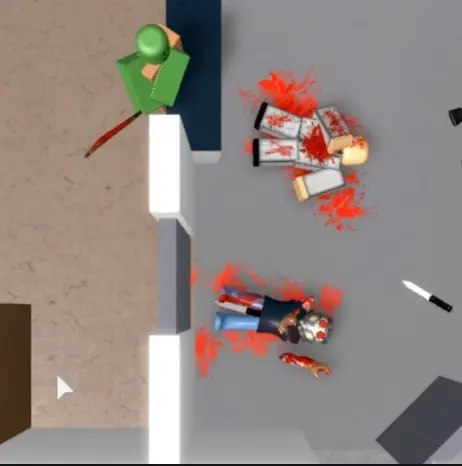
Parent tip: Before letting your child play a new Roblox game, search the title and read user comments — red flags often show up fast in community feedback.

One detail worth knowing: Roblox has no offline mode. Every time your child plays, they're connected to the live platform and interacting with the broader community. There's no way to use Roblox in a fully isolated, single-player environment.
Many parents assume Roblox is a harmless children's toy with light, age-appropriate content. The platform does have plenty of kid-friendly games. But it's also heavily used by teenagers and adults. Some user-created games are clearly designed for older audiences. The platform's standard account age requirement is 13 — which means a large number of older players are on the same platform as young children every day.
Parental controls are genuinely useful, but they're not a complete solution on their own. Settings can be accidentally misconfigured. Platform updates sometimes reset preferences. And kids, especially older ones, are resourceful about finding workarounds. Relying entirely on software controls — without regular conversation and monitoring — gives you a false sense of security.
| Common Myth | The Reality |
|---|---|
| Roblox is safe right out of the box | Default settings allow chat with strangers and access to all user-created games |
| The chat filter catches everything inappropriate | Filters block most content but aren't perfect — some messages slip through |
| Only young children use Roblox | Millions of teens and adults are active on the platform daily |
| Robux purchases need your credit card each time | Stored payment methods or gift cards let kids spend without your direct approval |
| Setting parental controls once is enough | Platform updates can reset settings; regular reviews are necessary |
Roblox offers an "Account Restrictions" feature that limits your child to a curated list of age-appropriate games and turns off all chat entirely. This is the most powerful built-in tool the platform offers. You enable it through the parental settings panel. You can also set a four-digit PIN so your child can't change the settings themselves. If your child is under 10, Account Restrictions is worth turning on immediately.

In-game purchases deserve their own attention. Robux can disappear surprisingly fast. Set a monthly spending limit through your account settings, or disable purchases altogether and only re-enable them for specific approved transactions. Before your child ever spends a single Robux, sit down and explain how the currency converts to real money — this conversation alone prevents a lot of problems.
Inside the account settings, you can control who can send your child messages, who can follow them into games, and who can invite them to private servers. Set all of these to "Friends" or "No One" depending on how cautious you want to be. Review these settings every few months — platform updates have a history of quietly resetting user preferences.

Roblox maintains a dedicated parent guide on their website. It covers every setting in plain language. Reading it once — even if just skimming — gives you a much clearer picture of what you can and can't control from the outside.
Before your child plays, set some non-negotiable rules together. Decide how long they can play each day. Agree that they will never share personal information — their real name, school name, neighborhood, or phone number — with any online player. Make it clear that if someone makes them feel uncomfortable or asks personal questions, they should stop, tell you, and block that user right away. Framing these as family rules rather than punishments makes kids more likely to follow them.
One talk isn't enough. Check in regularly and keep it casual. Ask your child what games they've been playing, which ones are their favorites, and whether they've met any new players. You're not interrogating — you're staying connected. Kids who feel they can speak openly with you are far more likely to come to you when something goes wrong online.
Building connection through everyday activities helps too. Something as relaxed as cooking together on a weekend — like a batch of honey BBQ pulled pork in the slow cooker — creates easy, low-pressure time where these kinds of conversations happen naturally.
Don't configure parental controls once and move on. Log into your child's account every few weeks. Glance at their friends list, their recent game activity, and their chat history. Let your child know you do this — transparency removes the sense of surveillance and sets an honest expectation. You're not looking for reasons to punish them. You're staying aware of their online world the same way you stay aware of their offline one.

Pay attention if your child becomes suddenly secretive about their gaming, closes the screen when you walk by, or seems upset or withdrawn after a session. These can signal that something uncomfortable happened online. Don't assume the worst, but do ask gentle questions and take their answers seriously.
Playing alongside your child is one of the most effective safety strategies available to you. You don't have to become a Roblox expert. Sit with them for 20 or 30 minutes and ask them to show you their favorite games. Kids genuinely enjoy this, and you get a direct window into how they interact online — no software monitoring required.
You don't need to overhaul everything in one sitting. A few targeted changes today can meaningfully improve your child's safety on Roblox. Here's where to start:
Even knocking out two or three of these today makes a real difference. Small, consistent actions build a much safer online environment over time — and they send your child a clear message that you're paying attention and that you care.
Roblox's terms of service set the minimum age at 13 for an unrestricted account. Younger children can use the platform with parental consent and tightened settings. Most child safety experts recommend active supervision for children under 10, and regular check-ins for older kids up through early teens.
Yes. You can log into your child's account and review their chat history directly. Roblox also retains chat logs and its moderation team reviews flagged messages. If you want to eliminate chat exposure entirely, enabling Account Restrictions turns off public chat for younger users.
The most effective approach is removing stored payment methods from the account and only adding them for specific approved purchases. You can also set a monthly spending limit through account settings. Before allowing any spending, explain to your child what Robux is worth in real dollars — that context alone tends to slow down impulse spending significantly.
Roblox can be a genuinely fun, creative platform for kids — but it works best with an engaged parent behind the scenes. Take 15 minutes today to review your child's account settings, tighten the privacy controls, and have a relaxed conversation about the rules. For more practical advice on raising kids safely in a connected world, browse our parenting guides — you'll find straightforward tips that make a real difference without adding stress to your day.
 |
 |
 |
 |

About Daisy Dao
Daisy Dao grew up in Honolulu, Hawaii, where coastal living and access to fresh local ingredients shaped her approach to home cooking from an early age. She has spent years experimenting with seafood preparation, healthy cooking methods, and ingredient substitutions — developing hands-on familiarity with a wide range of kitchen tools, techniques, and produce. At BuyKitchenStuff, she covers healthy recipes, cooking techniques, and ingredient substitution guides.
Check for FREE Gifts. Or get our Free Cookbooks right now.
Disable the Ad Block to reveal all the recipes. Once done that, click on any button below
|
|
|
|
